
Currently, the Unified Payments Interface (UPI) is the most commonly used payment interface for online payment transactions in India, as it’s very easy to use. Resetting the UPI PIN on a regular basis makes your transactions more secure. This blog guides you on how to change the UPI PIN using the BHIM UPI App in simple steps.
Also Check : Realme 13 4G Specifications
The Unified Payments Interface (UPI) completely changed the way of online money transferring. It’s very easy to operate, but you need to make sure that your money stays safe. The UPI PIN works as a safe guard to keep your money secure from any unauthorized transaction. As everyone knows, cybercrimes are at their peak every day. Scammers find new ways to scam people, so you need to change your UPI regularly so that your money stays safe. Many apps like GPay, PhonePe, Paytm, and BHIM UPI make resetting the UPI PIN very easy.
Check Out : Huawei Nova Flip Specifications
Before Resetting the Your BHIM UPI PIN using the app, you need to keep some things ready, such as the last six digits of your ATM card, the expiration date of your ATM card, and make sure that your mobile number should be linked with your bank account.
How to reset the UPI PIN using the BHIM app?
Resetting the UPI PIN using the BHIM app is very easy. You need to follow the steps given below:
Step 1: Open the Bhim app on your mobile.
Step 2: On the dashboard of the BHIM app, choose your bank account from the navigation/menu bar.
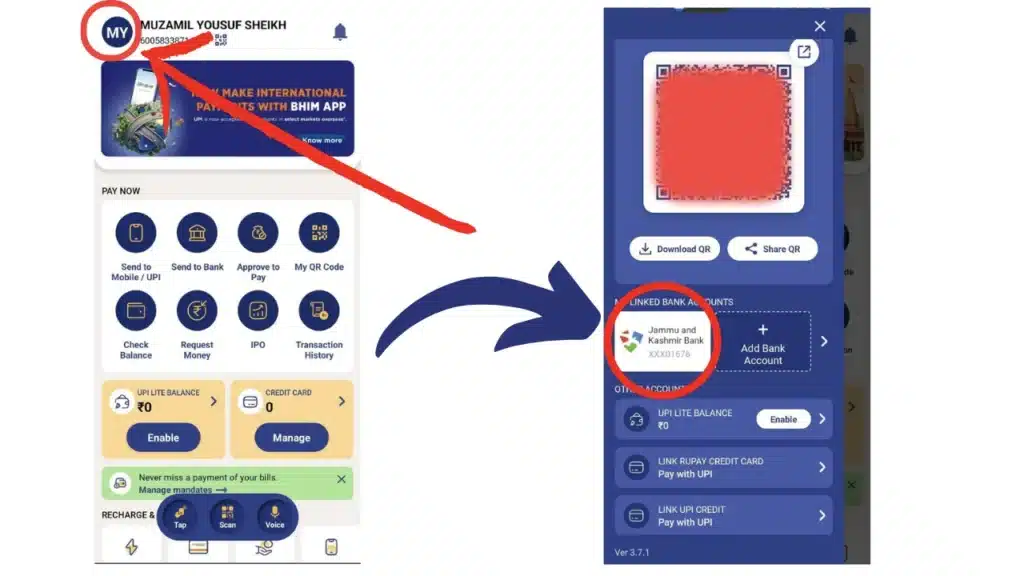
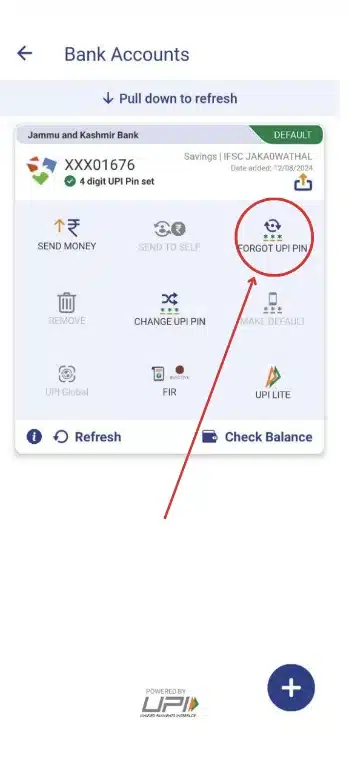
Step 3: Now click on the “Forgot UPI pin option.”
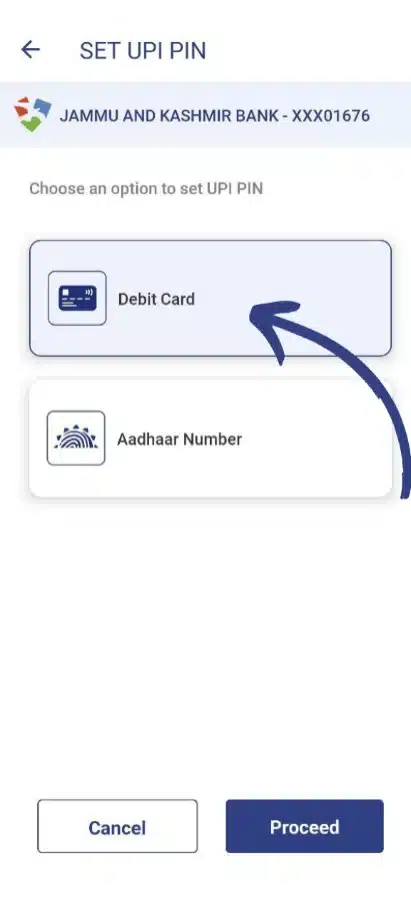
Step 4: Now choose the debit card option and click on proceed.
Step 5: Enter your last six digits of your debit card and the expiration date of your debit card to set the new UPI pin.
Step 6: Now you get an OTP on your registered mobile number from your bank. The app will automatically write the OTP.
Step 7: Enter your new pin that you want to keep.
Step 8: Now confirm your new pin.
All set, you have reset your UPI pin successfully.
Check Out : Google Pixel 9 Pro XL specs leak, AI feature demoed
What is UPI?
Unified Payments Interface (UPI) is a payment system that is developed by the National Payments Corporation of India (NPCI) of India and regulated by the RBI. UPI links multiple bank accounts in a single mobile app and allows users to transfer money from one bank account to another bank account through an UPI ID, QR code, or mobile number. UPI is also used for peer-to-peer (P2P) transactions such as paying bills and making online purchases.
Features of UPI
- Money can be transferred instantly from one bank to another bank at any time.
- It provides a single platform like an app to link multiple accounts for seamless transactions.
- Without using bank account details, transactions can be done using a virtual payment address a virtual payment address (VPA).
- UPI transactions are very secured.
Conclusion
UPI revolutionized the way of transferring money, such as P2P transactions, paying or receiving money from one bank account to another using Virtual Payment Address (VPA). It’s a simple and secure payment system, and regularly reseting the UPI is very important to keep your money safe from scams and any unauthorized access, as cybercrimes are increasing quickly.
News : OnePlus Open Apex Edition Announced
Reset UPI PIN FAQs
What is UPI?
UPI is a payment system that is used to transfer or receive money from one bank account to another using a UPI ID.
What is UPI ID?
A UPI ID is a unique ID linked with your bank account used to pay or receive money through UPI. For example, abc@paytm, 123abc@upi, etc.
What is the UPI limit per day?
NPCI sets a 1 lakh limit on per transaction through UPI. You can transfer 1 lakh per day using UPI and can do it in 10 transactions max.

Vishal Jakhar is a Senior Writer at TechBurj.Com He has penned over a hundred articles on TechBurj covering a wide range of topics on tech.
Below here you can find some of his interesting articles related to mobiles and gadgets.