
PhonePe is an online payments and financial app based in India founded by Sameer Nigam, Rahul Chari, Burzin Engineer, and Amit Narang. PhonePe becomes one of the leading online payment apps in India. It allows users to make many types of online transactions, such as money transfers, bill payments, mobile recharges, merchant payments, and users can invest in mutual funds, purchase insurance policies, and even buy gold through the app, and much more.
Check Out : Reset UPI PIN How to Reset UPI PIN Using BHIM UPI App know the steps
PhonePe also allows users to add multiple bank accounts to pay or receive money, recharge, pay bills, etc. It’s very simple to add multiple bank accounts on PhonePe. Just follow the steps below.
Check Out : Samsung Galaxy S23 FE vs Samsung Galaxy A55 Comparison and Review
Benefits of using multiple accounts on PhonePe app
Before going to the steps, you should consider how beneficial using multiple bank accounts on PhonePe is:
- You can manage all the bank accounts in one app.
- You can choose a different account for every transaction.
- You can transfer money from one account to another account without switching the apps.
News : OnePlus Open Apex Edition Announced
How to Add Multiple Bank Accounts On PhonePe
Here is the step-by-step guide on how to add more than one account on PhonePe:
Step 1: Open your phonepe app on your mobile
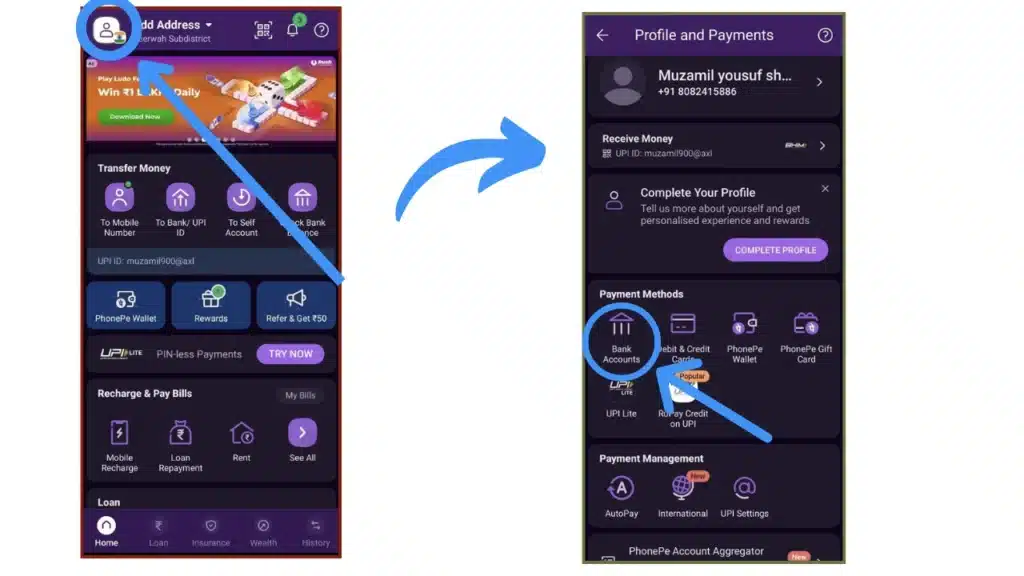
Step 2: Click on the profile button, then click on bank accounts.

Step 3: Now click on the “add new bank account” option.

Step 4: Search for your bank name that you want to add and make sure that your mobile number should be added to your bank account.

Step 5: Click on your bank name, and the app will automatically fetch your bank accounts that are linked to your mobile.
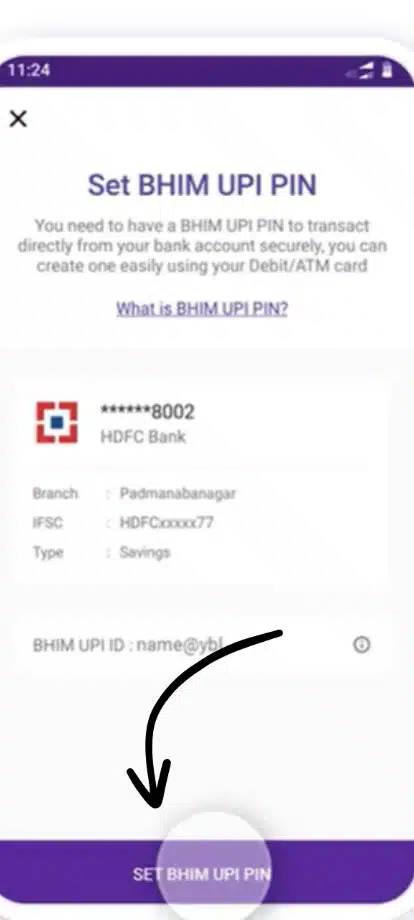
Step 6: Setup your UPI pin by clicking on the “Set UPI PIN”

Step 7: Enter your ATM card details.

Step 8: Finally, you get an OTP from your bank. input it and setup the UPI PIN.

All set, you successfully added your bank account to the PhonePe app. Now you can manage all your bank accounts easily, such as changing the default account at any time in the bank accounts section, while paying money to another bank account, you can select the bank account from which you want to pay.
Check : Nothing Phone (2a) Plus Specifications
Conclusion
In today’s blog, we learned how to add multiple bank accounts on the PhonePe app. Adding bank accounts on the PhonePe is very easy. The phonepe is a user-friendly app that allows users to manage multiple bank accounts in one app and makes paying and receiving money or other financial services very simple and more seamless.
News : Realme to unveil 300W wired charging technology soon
FAQs
Can I link multiple bank accounts to PhonePe?
Yes, PhonePe allows users to add multiple bank accounts on its application.
How many accounts can be used in PhonePe?
A user can use multiple bank accounts on the PhonePe app, but you also have to make one default account for receiving payments.
What is the limitation of PhonePe?
The daily transaction limit on Phonepe is 1 lakh on UPI transactions, which means you can transfer up to 1 lakh per day, and the maximum number of transactions that can be done is 20.
What is the minimum balance in PhonePe?
There are no restrictions by PhonePe on maintaining a minimum balance. Customers don’t have to maintain any minimum . balance

Vishal Jakhar is a Senior Writer at TechBurj.Com He has penned over a hundred articles on TechBurj covering a wide range of topics on tech.
Below here you can find some of his interesting articles related to mobiles and gadgets.