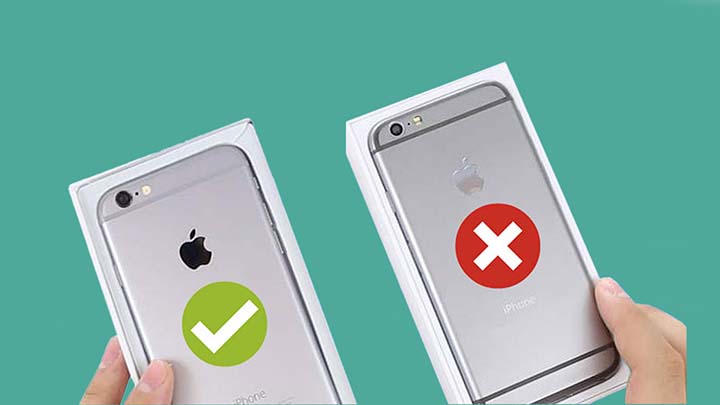
With the increasing prevalence of counterfeit products in the market, it’s essential for iPhone buyers to ensure they’re purchasing a genuine Apple device. Fake iPhones, often marketed as “refurbished” or “unlocked,” may look identical to the original but can fall short in terms of performance, durability, and security. Thankfully, there are multiple ways to verify whether your iPhone is genuine or counterfeit. In this article, we’ll explore several effective methods you can use to determine if your iPhone is authentic.
Check the Serial Number or IMEI
One of the easiest and most reliable ways to verify if an iPhone is original is by checking its serial number or IMEI (International Mobile Equipment Identity) number. These unique identifiers can be cross-checked with Apple’s official database to determine if the device is genuine.

How to Find the Serial Number and IMEI:
- Via Settings:
- Open the “Settings” app on your iPhone.
- Scroll down and tap on “General.”
- Tap on “About.”
- Here, you will see the serial number and IMEI.
- Via the Device’s Packaging:
If you have the original packaging, the serial number and IMEI are usually printed on the box.
Verifying the Number:
- Once you have the serial number or IMEI, go to Apple’s official website and enter the number in the “Check Your Coverage” section. If the device is genuine, Apple will show you details about its warranty status, model, and more. If the number is not recognized, or if the details are inconsistent, the device may be counterfeit.
Examine the Build Quality
Apple’s manufacturing standards are exceptionally high, and a genuine iPhone is likely to have premium build quality. Counterfeit iPhones, on the other hand, often feature inferior craftsmanship.

What to Look For:
- Material: Genuine iPhones are made from premium materials like aluminum and glass. If the back of the device feels cheap or plastic, it’s likely a fake.
- Weight: Fake iPhones are often lighter or heavier than their authentic counterparts due to substandard materials.
- Button Placement: The placement and feel of the buttons, including the volume buttons, mute switch, and power button, should be precise. Counterfeit devices may have buttons that are misaligned, too soft, or difficult to press.
- Screen Quality: Apple uses high-quality Retina displays that provide sharp, vibrant colors. A fake iPhone might have a dull or pixelated screen with poor color accuracy.
Verify the Operating System
The operating system is another critical area that can help distinguish a fake iPhone from a real one. Genuine iPhones run Apple’s iOS, while counterfeit models typically use Android OS with a skin designed to resemble iOS.
How to Check:
- Look for iOS Features:
If the interface doesn’t look like iOS, or if there are significant differences in the way apps, settings, and features are organized, the phone is likely a counterfeit. - App Store:
Only authentic iPhones have access to the Apple App Store. If the device has a different app marketplace or cannot access the App Store, it’s a sign the device is not genuine. - System Updates:
iPhones receive regular system updates from Apple. If you try to update the software and receive an error message, or if the phone has not received updates for an extended period, it could be a counterfeit device.
Examine the Apple Logo
The Apple logo on a genuine iPhone is often finely etched or printed, with a sharp, crisp appearance. Counterfeit devices may have logos that are blurry, poorly printed, or off-center. Some fakes even use a glossy finish for the logo, while authentic iPhones feature a matte logo on many models.
Check the Camera Quality
Apple’s iPhones are known for their high-quality cameras. Fake iPhones often use inferior camera modules, which can result in poor image quality.
What to Test:
- Photos: Take a few photos in different lighting conditions and compare them to images taken with a genuine iPhone. Low-resolution, blurry, or poorly lit images may indicate a fake device.
- Camera Features: Genuine iPhones have advanced camera features like Portrait Mode, Night Mode, and ProRAW. If the camera app doesn’t have these features or operates unusually, the phone may be counterfeit.
Check the Face ID or Touch ID
Apple has always placed a strong emphasis on security, and features like Face ID and Touch ID are a staple in genuine iPhones. If your iPhone claims to have Face ID or Touch ID but doesn’t work as expected, it could be a fake.

- Face ID: Set up Face ID by following the on-screen instructions. If the process fails or Face ID doesn’t work smoothly, the device may not be authentic.
- Touch ID: Similarly, test the Touch ID feature (if available). A sluggish or inconsistent response could indicate a counterfeit iPhone.
Inspect the Box and Accessories
If you still have the box and accessories, carefully examine them for authenticity. Apple is known for its attention to detail in packaging, and counterfeit iPhones often come in poorly made boxes with incorrect fonts, graphics, and logos.
- Box: The packaging of a real iPhone will have clear, high-quality printing, correct spelling, and precise logo placement. Counterfeit packaging might have smudges or the wrong fonts.
- Accessories: Check the accessories such as the charging cable, power adapter, and earphones. Genuine Apple accessories are high-quality and come with precise, well-made connectors. Fake accessories often have cheap materials and poor construction.
Use a Diagnostic Tool
Several third-party apps, like Genius Scan or Phone Doctor, can scan the hardware of your device to detect discrepancies in its performance. These apps can check the device’s storage capacity, battery health, and performance, helping you verify whether the phone is real or not.
Conclusion
Ensuring that your iPhone is original is vital for receiving the best performance, security, and customer support. By following the methods above—such as verifying the serial number, inspecting the device’s physical build, checking the software, and testing key features—you can confidently determine whether your iPhone is genuine or counterfeit. Always be cautious when buying secondhand or from unofficial sellers to avoid the risk of purchasing a fake device. If in doubt, visit an Apple Store or authorized service provider for a professional evaluation.
Hindi Version
आजकल मार्केट में नकली उत्पादों की संख्या बढ़ रही है, और इसका असर Apple iPhone पर भी पड़ा है। बहुत से लोग नकली iPhones को “रिफर्बिश्ड” या “अनलॉक” बताकर बेचते हैं। ये नकली iPhones असली iPhones जैसे दिखते हैं, लेकिन इनमें प्रदर्शन, मजबूती और सुरक्षा में कमी होती है। इसलिए यह जरूरी है कि आप iPhone खरीदने से पहले यह सुनिश्चित करें कि वह असली है या नहीं। इस लेख में हम कुछ आसान तरीकों के बारे में बात करेंगे जिनसे आप पता कर सकते हैं कि आपका iPhone असली है या नकली।
सीरियल नंबर या IMEI चेक करें
iPhone की असलियत जानने का सबसे सरल और विश्वसनीय तरीका है इसके सीरियल नंबर या IMEI (International Mobile Equipment Identity) नंबर को चेक करना। ये यूनिक आइडेंटिफायर्स होते हैं, जिन्हें आप Apple की आधिकारिक वेबसाइट पर चेक करके पता कर सकते हैं कि डिवाइस असली है या नहीं।
सीरियल नंबर और IMEI कैसे खोजें:
- सेटिंग्स के माध्यम से:
- अपने iPhone में “Settings” ऐप खोलें।
- “General” पर टैप करें।
- “About” पर टैप करें।
- यहां आपको सीरियल नंबर और IMEI मिल जाएंगे।
- डिवाइस के पैकेजिंग से:
अगर आपके पास डिवाइस का बॉक्स है, तो उस पर भी सीरियल नंबर और IMEI छपा होता है।
नंबर को वेरीफाई कैसे करें:
- एक बार जब आपके पास सीरियल नंबर या IMEI हो, तो Apple की आधिकारिक वेबसाइट पर जाएं और “Check Your Coverage” सेक्शन में नंबर डालें। अगर डिवाइस असली है, तो Apple आपको उसकी वारंटी स्टेटस, मॉडल, और अन्य जानकारी दिखाएगा। अगर नंबर स्वीकार नहीं किया जाता या जानकारी असंगत होती है, तो डिवाइस नकली हो सकता है।
निर्माण गुणवत्ता की जांच करें
Apple का निर्माण गुणवत्ता बहुत उच्च होता है। असली iPhone में प्रीमियम निर्माण सामग्री होती है, जबकि नकली iPhones अक्सर सस्ती और घटिया सामग्री से बने होते हैं।
क्या देखें:
- सामग्री: असली iPhones एल्युमिनियम और ग्लास से बने होते हैं, जबकि नकली iPhones में प्लास्टिक जैसी सस्ती सामग्री हो सकती है।
- वजन: नकली iPhones असली iPhones से हल्के या भारी हो सकते हैं क्योंकि इनमें सस्ते मटेरियल होते हैं।
- बटन की स्थिति: असली iPhone में बटन का स्थान और दबाव सही होता है। नकली डिवाइस में बटन मिसअलाइन, बहुत सॉफ्ट, या दबाने में कठिन हो सकते हैं।
- स्क्रीन गुणवत्ता: असली iPhones में Retina डिस्प्ले होता है, जो बेहद शार्प और रंगीन होता है। नकली iPhones में स्क्रीन की गुणवत्ता घटिया हो सकती है, जिसमें पिक्सल गड़बड़ी, धुंधलापन, और रंगों की कमी हो सकती है।
ऑपरेटिंग सिस्टम की जांच करें
ऑपरेटिंग सिस्टम नकली iPhones और असली iPhones के बीच का सबसे बड़ा अंतर हो सकता है। असली iPhones iOS ऑपरेटिंग सिस्टम पर चलते हैं, जबकि नकली iPhones में अक्सर Android OS होता है, जिसपर iOS जैसा इंटरफेस होता है।
कैसे चेक करें:
- iOS फीचर्स देखें:
अगर इंटरफेस iOS जैसा नहीं दिखता या ऐप्स और सेटिंग्स में अंतर महसूस होता है, तो डिवाइस नकली हो सकता है। - App Store:
असली iPhones में केवल Apple App Store का एक्सेस होता है। अगर डिवाइस में कोई अलग ऐप मार्केटप्लेस है या App Store एक्सेस नहीं हो पा रहा है, तो यह एक संकेत हो सकता है कि डिवाइस नकली है। - सिस्टम अपडेट्स:
असली iPhones को नियमित रूप से Apple से सिस्टम अपडेट्स मिलते हैं। अगर डिवाइस में अपडेट का विकल्प नहीं आ रहा है या लंबी अवधि से अपडेट नहीं हुआ है, तो यह नकली हो सकता है।
Apple का लोगो जांचें
असली iPhone पर Apple का लोगो आमतौर पर बहुत साफ और सटीक होता है। नकली iPhones में यह लोगो धुंधला, गलत या असमय हो सकता है। कुछ नकली iPhones में लोगो पर गिरी हुई चमक होती है, जबकि असली iPhones में यह एक मैट फिनिश के साथ होता है।
कैमरा गुणवत्ता की जांच करें
Apple iPhones के कैमरे की गुणवत्ता बहुत उच्च होती है। नकली iPhones में कैमरे की गुणवत्ता अक्सर खराब होती है और वह तस्वीरें उतनी स्पष्ट नहीं होतीं।
क्या जांचें:
- तस्वीरें:
विभिन्न रोशनी की परिस्थितियों में कुछ तस्वीरें लें और उन्हें असली iPhone से तुलना करें। अगर तस्वीरें धुंधली, कम-रिजॉल्यूशन वाली, या खराब लाइटिंग में दिखती हैं, तो यह एक संकेत हो सकता है कि डिवाइस नकली है। - कैमरा फीचर्स:
असली iPhones में पोर्ट्रेट मोड, नाइट मोड, और ProRAW जैसे उन्नत कैमरा फीचर्स होते हैं। अगर कैमरा ऐप में ये फीचर्स नहीं हैं या ऐप असामान्य तरीके से काम करता है, तो यह नकली हो सकता है।
Face ID या Touch ID चेक करें
Apple ने सुरक्षा के लिए Face ID और Touch ID जैसे फीचर्स दिए हैं। अगर आपका iPhone इन फीचर्स का दावा करता है, लेकिन वे ठीक से काम नहीं करते, तो यह संकेत हो सकता है कि यह नकली है।
- Face ID: Face ID सेटअप करें और देखें कि क्या यह ठीक से काम करता है। अगर यह काम नहीं करता, तो यह एक नकली iPhone हो सकता है।
- Touch ID: Touch ID को चेक करें। अगर यह धीरे-धीरे काम करता है या सही तरीके से जवाब नहीं देता, तो यह नकली iPhone हो सकता है।
बॉक्स और एक्सेसरीज़ की जांच करें
अगर आपके पास iPhone का बॉक्स और एक्सेसरीज़ हैं, तो उन्हें ध्यान से जांचें। असली iPhones का पैकिंग बहुत उच्च गुणवत्ता का होता है, जबकि नकली iPhones का बॉक्स और एक्सेसरीज़ अक्सर खराब गुणवत्ता के होते हैं।
- बॉक्स: असली iPhone का बॉक्स उच्च गुणवत्ता का होता है, जिस पर सही फोंट, ग्राफिक्स, और लोगो होता है। नकली बॉक्स पर गलत फोंट या मिचली प्रिंटिंग हो सकती है।
- एक्सेसरीज़: असली Apple एक्सेसरीज़ उच्च गुणवत्ता की होती हैं, जैसे कि चार्जिंग केबल, पावर अडैप्टर, और इयरफोन। नकली एक्सेसरीज़ में सस्ती सामग्री और खराब निर्माण हो सकता है।
डायग्नोस्टिक टूल्स का उपयोग करें
कई थर्ड-पार्टी ऐप्स, जैसे Phone Doctor या Genius Scan, डिवाइस की हार्डवेयर की जांच कर सकते हैं। ये ऐप्स डिवाइस की स्टोरेज, बैटरी स्वास्थ्य, और प्रदर्शन को चेक करके मदद कर सकते हैं।
निष्कर्ष
अपने iPhone की असलियत की जांच करना महत्वपूर्ण है, ताकि आप उसकी प्रदर्शन, सुरक्षा और ग्राहक समर्थन से लाभ उठा सकें। ऊपर बताए गए तरीकों से, जैसे सीरियल नंबर और IMEI की जांच, डिवाइस की गुणवत्ता और सॉफ़्टवेयर की जांच, आप आसानी से जान सकते हैं कि आपका iPhone असली है या नकली। हमेशा ध्यान रखें कि अगर आप दूसरे हाथ से iPhone खरीद रहे हैं या अनौपचारिक विक्रेता से खरीद रहे हैं, तो सावधानी बरतें। अगर आपको शक हो, तो Apple स्टोर या अधिकृत सेवा प्रदाता से पेशेवर मूल्यांकन करवाएं।

Vishal Jakhar is a Senior Writer at TechBurj.Com He has penned over a hundred articles on TechBurj covering a wide range of topics on tech.
Below here you can find some of his interesting articles related to mobiles and gadgets.